Runtime configuration
The details defining the geometry of the detector strings and water tank instrumentation can be specified at runtime using configuration files. This allows for flexible geometry generation without needing to modify the code directly.
The raw configuration files are located in src/pygeoml1000/configs/. These
consist of high-level geometry parameters (e.g. number of detectors per string,
PMT positions) that are used in the script execution to generate the
special_metadata and channelmap objects. The former is a detailed spatial
configuration of the geometry, while the latter defines the detector mapping and
electronics configuration similar to the channelmap defined in the usual
metadata. legend-pygeom-l1000 uses these objects to place the geometry of the
specified objects in the geometry. In addition, a compiled version of these
objects can be returned and again fed into the geometry generation. This system
allows users to easily create different geometry variants by modifying first the
raw config files for high-level changes, then by modifying the compiled config
for more detailed changes.
This section first discusses the configuration file format and structure, then the compilation process, and finally, best practices for using the configuration system effectively.
Raw configuration files
The raw configuration files are YAML files located in
src/pygeoml1000/configs/. Each file controls a specific aspect of the
geometry. A custom folder can be passed at runtime via
--input-raw-config-folder.
The configs folder in the source directory contains the following raw config
files:
configs/
├── array.yaml
├── crystal.yaml
├── detail.yaml
├── hpge.yaml
├── pmts_pos.yaml
├── pmts.yaml
├── sipm.yaml
└── string.yaml
array.yaml — String array layout
Defines the positions and orientations of the detector string array:
center:
  x_in_mm: [0.0, 533.7, 106.7, -427.0, -533.7, -106.7, 427.0]
  y_in_mm: [0.0, 184.9, 554.7, 369.8, -184.9, -554.7, -369.8]
radius_in_mm: 213.5
angle_in_deg: [0, 60, 120, 180, 240, 300]
center: lists of x/y coordinates (in mm) for each string cluster center. The number of clusters is given by the length of these lists.radius_in_mm: the radius at which individual strings are placed around their cluster center.angle_in_deg: the angular positions (in degrees) for the strings within a cluster. The total number of strings islen(center.x_in_mm) × len(angle_in_deg).
string.yaml — Detector string properties
Defines the physical parameters of a single detector string:
units:
  n: 8
  l: 140.1
copper_rods:
  r: 1.5
  r_offset_from_center: 51
n_sipm_modules_per_string: 3
units.n: number of HPGe detector slots per string.units.l: spacing between detector units along the string axis (in mm).copper_rods.r: copper rod radius (in mm).copper_rods.r_offset_from_center: radial offset of the copper rods from the string center (in mm).n_sipm_modules_per_string: number of SiPM fiber modules per string.
hpge.yaml — HPGe detector template
Provides the template channelmap entry for all HPGe detectors. All detectors in
the generated channelmap start from this template and have their name,
daq.rawid, location.string, and location.position fields overwritten
during compilation. The template includes full geometry, production, and
characterization sub-fields following the standard LEGEND metadata format.
sipm.yaml — SiPM module template
Provides the template channelmap entry for SiPM fiber modules. During
compilation, name, location.barrel, location.fiber, location.position,
and daq.rawid are filled in for each module. SiPM raw IDs start at 5000.
pmts.yaml — PMT template
Provides the template channelmap entry for all PMTs. During compilation, name,
daq.rawid, and location (including x, y, z coordinates and the PMT
orientation direction) are filled in. PMT raw IDs start at 6000.
pmts_pos.yaml — PMT placement
Defines the spatial layout of floor and wall PMTs:
floor:
  row1: {id: 1, n: 50, r: 3800}
  ...
tyvek:
  faces: 15
  r: 4000
wall:
  row1: {id: 1, n: 35, z: 1811.1}
  ...
floor: each entry defines a ring of PMTs at the tank floor withnPMTs at radiusr(in mm). PMTs withrlarger thanwatertank.tank_pit_radiusare automatically raised towatertank.tank_pit_height.tyvek.faces: number of polygon faces of the Tyvek reflector wall. Determines the wall geometry for PMT placement.tyvek.r: inscribed radius of the Tyvek polygon (in mm). The circumradius used for PMT placement is computed asr / cos(π / faces).wall: each entry defines a ring of PMTs at heightz(in mm) withnPMTs distributed across the polygon faces.
detail.yaml — Detail level presets
Defines which geometry assemblies are included for each named detail level:
cosmogenic:
  cavern: simple
  watertank: simple
  ...
radiogenic:
  cavern: omit
  watertank: omit
  ...
Each key is a named preset (e.g. cosmogenic, radiogenic) selectable via the
--detail CLI option. Assembly values follow the pygeomtools assembly detail
convention (omit, simple, stl, detailed, metadata, place).
crystal.yaml — Crystal boule profile
Stores the impurity profile and slice offsets for the HPGe crystal boule used as
the default detector template with the same format as in the metadata. This file
is used to populate the characterization fields of the hpge.yaml template.
It is required to generate the drift-time map used in the post-processing of the
pulse-shape discrimination.
Compilation
The compilation step converts the raw config files into the two runtime objects
— special_metadata and channelmap — via config_compilation.py.
special_metadata contains the detailed spatial layout used for geometry
placement:
hpge_string: per-string center coordinates, angle, and rod geometry.hpges: per-detector rod length and baseplate type.fibers: per-SiPM-module position derived from the string array layout.watertank_instrumentation: Tyvek polygon parameters.detail: the full detail level presets copied fromdetail.yaml.
channelmap contains the detector mapping and electronics configuration:
One entry per HPGe detector with location (string and position index) and raw ID.
One entry per SiPM top/bottom channel with fiber name, barrel index, and raw ID.
One entry per PMT with x/y/z position, orientation direction vector, and raw ID.
To generate the compiled config from the default raw configs, run:
$ legend-pygeom-l1000 --generate-compiled-config --output-compiled-config config.yaml
To use a custom raw config folder:
$ legend-pygeom-l1000 --generate-compiled-config \
    --input-raw-config-folder /path/to/my/configs \
    --output-compiled-config config.yaml
The output is a single YAML file with channelmap and special_metadata as
top-level keys.
Best practices
Start from the raw configs for high-level structural changes (e.g. number of strings, PMT ring positions). Regenerate the compiled config afterwards. Alternatively, if you want to keep the default raw configs unchanged, copy the raw config folder using the
--copy-raw-configs-into-cwd-folderflag and pass--input-raw-config-folderto use your custom raw configs without modifying the defaults.Edit the compiled config for fine-grained adjustments (e.g. removing individual detectors, overriding a single position or raw ID) without touching the raw files. Generate the config with
--generate-compiled-configand--output-compiled-config.Pass the compiled config to the geometry builder via
--compiled-configto bypass the compilation step and use your customized values directly:$ legend-pygeom-l1000 -V --compiled-config config.yaml output.gdml
Note that --input-raw-config-folder is silently ignored when
--compiled-config is provided — the compiled config always takes precedence.
Keep your custom raw config in a dedicated folder and pass
--input-raw-config-folder so the default configs remain unchanged and the
variant is self-contained.
Examples
Minimal single-ring geometry (6 strings)

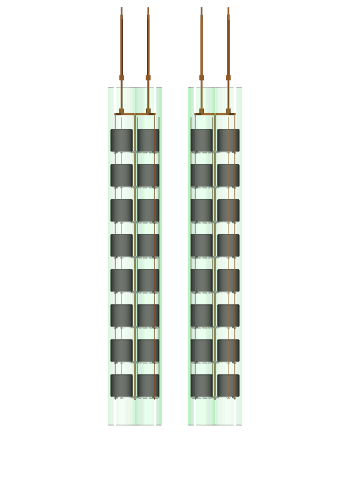
A compact geometry with one central cluster of 6 strings is useful for fast test
simulations or studies that do not require the full array. Edit array.yaml in
a copy of the configs folder to reduce the cluster list to a single entry at the
origin:
# array.yaml
center:
  x_in_mm: [0.0]
  y_in_mm: [0.0]
radius_in_mm: 213.5
angle_in_deg: [0, 60, 120, 180, 240, 300]
Then compile:
$ legend-pygeom-l1000 -V --input-raw-config-folder ./my_configs/
This produces 6 strings (V0101-V0608, 48 HPGe detectors total), 36 SiPM
channels, and the full PMT complement (unchanged, since pmts_pos.yaml was not
modified).
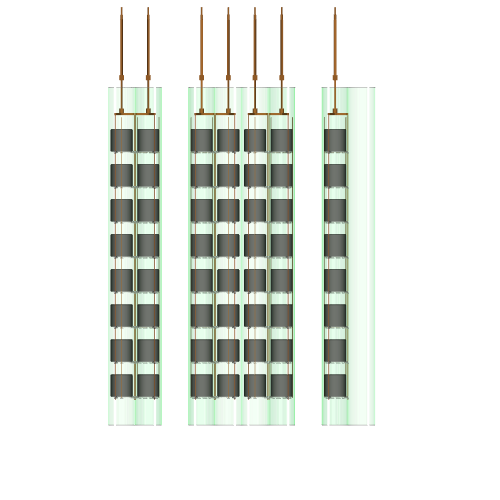
Two-ring geometry (12 strings)
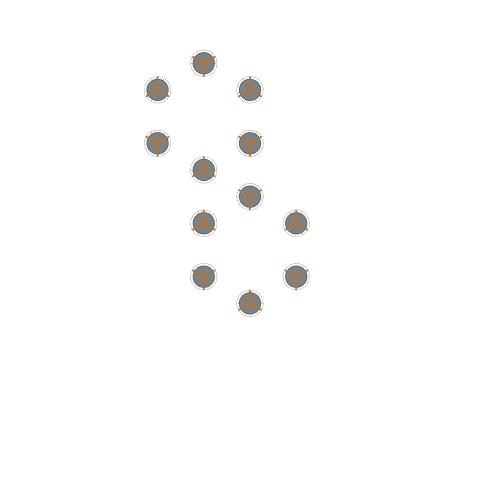
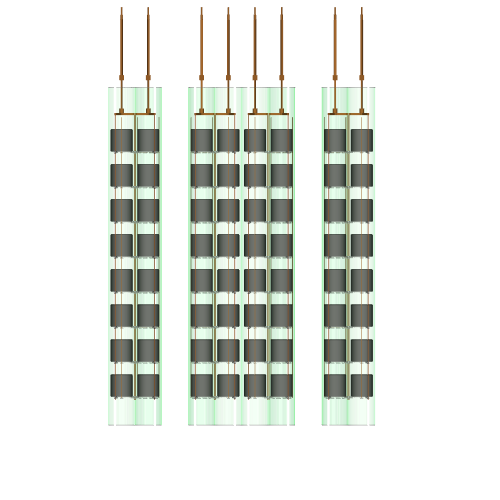
To simulate two string clusters placed around their respective centers, set two
entries in array.yaml:
# array.yaml
center:
  x_in_mm: [0.0, 533.7]
  y_in_mm: [0.0, 184.9]
radius_in_mm: 213.5
angle_in_deg: [0, 60, 120, 180, 240, 300]
Compiling this produces 12 strings (V0101-V1208, 96 HPGe detectors), 72 SiPM
channels, and the full PMT complement.
Removing a specific detector or string from the compiled config
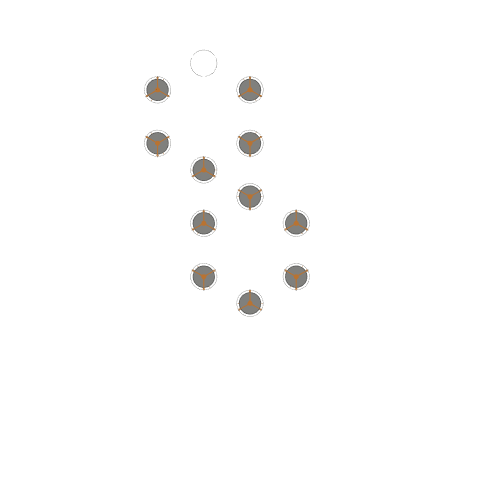
After compiling, individual detectors can be removed by deleting their entries
from the channelmap and special_metadata.hpges sections of the compiled
YAML. For example, to remove V0701 (position 1 of string 7) from the 12-string
config:
Delete the
V0701key fromchannelmap.Delete the
V0701key fromspecial_metadata.hpges.
The remaining 95 HPGe detectors are placed normally. The missing slot is simply left empty in the string.
To remove an entire string (e.g. string 7) from the geometry, delete:
in the
channelmap:all
gedsentries withlocation.string: 7,all
spmsentries withlocation.barrel: 7,
in the
special_metadata:all entries with
V07xxinhpges,all entries with
S07xxinfibers, andthe entry for string
'7'inhpge_string
To remove all detectors of a string (e.g. string 7), but keep the SiPM modules
and fibers, only delete the geds entries in the channelmap and the V07xx
entries in hpges in the special_metadata.
Replacing the default HPGe template with a custom one
To use a custom HPGe template, create a modified copy of hpge.yaml with the
desired geometry and characterization fields. The geometry is defined using the
standard format of the legend metadata (e.g. the example geometries found in the
remage
tutorial).
At the moment, there is only support for using a single geometry template for
all detectors, though in the future this will be generalized to allow for
multiple geometries per setup.